Verify email email
Confirm-your-address email with a button, a fallback link and the expiry window spelled out.
11.4 KB · Gmail-safe
Code
import * as React from "react";
import { Btn, Divider, Eyebrow, Fallback, H1, P, Shell, Small, type TemplateProps } from "../components";

export type VerifyEmailProps = TemplateProps & {
  email?: string;
  verifyUrl?: string;
  expiresInHours?: number;
};

export default function VerifyEmail({
  style,
  brand,
  email = "maya@northbeam.co",
  verifyUrl = "https://fieldnote.app/verify?token=8f3a1c9e2b7d",
  expiresInHours = 24,
}: VerifyEmailProps) {
  return (
    <Shell style={style} brand={brand} label="Account" preview={`Confirm ${email} to finish setting up your account.`}>
      <Eyebrow>One quick step</Eyebrow>
      <H1>Confirm your email address</H1>
      <P>
        Tap the button below to confirm <strong>{email}</strong> belongs to you. This keeps your account secure and
        makes sure you get receipts and security alerts.
      </P>
      <Btn href={verifyUrl}>Confirm email address</Btn>
      <Small>This link expires in {expiresInHours} hours and can only be used once.</Small>
      <Divider my={24} />
      <Fallback href={verifyUrl} />
      <Small mb={0}>Didn't create an account? You can safely ignore this email — nothing will happen.</Small>
    </Shell>
  );
}

VerifyEmail.PreviewProps = { email: "maya@northbeam.co" } satisfies VerifyEmailProps;
<!DOCTYPE html PUBLIC "-//W3C//DTD XHTML 1.0 Transitional//EN" "http://www.w3.org/TR/xhtml1/DTD/xhtml1-transitional.dtd"><html dir="ltr" lang="en"><head><meta content="text/html; charset=UTF-8" http-equiv="Content-Type"/><meta name="x-apple-disable-message-reformatting"/><meta name="color-scheme" content="light dark"/><meta name="supported-color-schemes" content="light dark"/><meta name="x-apple-disable-message-reformatting"/><meta name="format-detection" content="telephone=no,address=no,email=no,date=no,url=no"/><style>:root{color-scheme:light dark;supported-color-schemes:light dark}
body{margin:0;padding:0;-webkit-text-size-adjust:100%;-ms-text-size-adjust:100%}
img{border:0;outline:none;text-decoration:none;-ms-interpolation-mode:bicubic}
a{text-decoration:none}
.mb-logo-dark{display:none;max-height:0;overflow:hidden}
@media only screen and (max-width:620px){
.mb-pad{padding-left:24px !important;padding-right:24px !important}
.mb-outer{padding-left:12px !important;padding-right:12px !important}
.mb-h1{font-size:24px !important;line-height:1.2 !important}
.mb-stack{display:block !important;width:100% !important;box-sizing:border-box}
.mb-stack-gap{padding-top:12px !important;padding-left:0 !important;padding-right:0 !important}
.mb-hide-mobile{display:none !important}
.mb-full{width:100% !important;display:block !important}
}
@media (prefers-color-scheme: dark){
.mb-page{background-color:#0D0E11 !important}
.mb-card{background-color:#17181C !important;border-color:#2C2F36 !important}
.mb-subtle{background-color:#1F2126 !important;border-color:#2C2F36 !important}
.mb-border{border-color:#2C2F36 !important}
.mb-heading{color:#F4F5F7 !important}
.mb-text{color:#D5D8DE !important}
.mb-muted{color:#959AA4 !important}
.mb-ink{background-color:#F4F5F7 !important;color:#0D0E11 !important}
.mb-logo-light{display:none !important;max-height:0 !important}
.mb-logo-dark{display:block !important;max-height:none !important}
}
[data-ogsb] .mb-page{background-color:#0D0E11 !important}
[data-ogsb] .mb-card{background-color:#17181C !important}
[data-ogsb] .mb-subtle{background-color:#1F2126 !important}
[data-ogsc] .mb-heading{color:#F4F5F7 !important}
[data-ogsc] .mb-text{color:#D5D8DE !important}
[data-ogsc] .mb-muted{color:#959AA4 !important}</style></head><body class="mb-page" style="background-color:#F2F3F5;margin:0;padding:0;width:100%"><!--$--><!--html--><!--head--><!--body--><div style="display:none;overflow:hidden;line-height:1px;opacity:0;max-height:0;max-width:0" data-skip-in-text="true">Confirm maya@northbeam.co to finish setting up your account.<div> </div></div><table role="presentation" width="100%" cellPadding="0" cellSpacing="0" class="mb-page" style="width:100%;background-color:#F2F3F5;font-family:-apple-system, BlinkMacSystemFont, 'Segoe UI', 'Helvetica Neue', Helvetica, Arial, sans-serif"><tbody><tr><td align="center" class="mb-outer" style="padding:32px 16px 48px"><table align="center" width="100%" border="0" cellPadding="0" cellSpacing="0" role="presentation" style="max-width:600px;width:100%"><tbody><tr style="width:100%"><td><table align="center" width="100%" border="0" cellPadding="0" cellSpacing="0" role="presentation" style="padding:8px 8px 24px"><tbody><tr><td><img class="mb-logo-light" alt="Fieldnote" height="32" src="https://getmailblocks.com/brand/fieldnote-logo.png" style="display:block;outline:none;border:none;text-decoration:none" width="132"/><div class="mb-logo-dark" style="display:none;max-height:0;overflow:hidden;mso-hide:all"><img alt="Fieldnote" height="32" src="https://getmailblocks.com/brand/fieldnote-logo-dark.png" style="display:block;outline:none;border:none;text-decoration:none" width="132"/></div></td></tr></tbody></table><table align="center" width="100%" border="0" cellPadding="0" cellSpacing="0" role="presentation" class="mb-card" style="background-color:#FFFFFF;border:1px solid #E4E6EA;border-radius:14px"><tbody><tr><td><table align="center" width="100%" border="0" cellPadding="0" cellSpacing="0" role="presentation"><tbody style="width:100%"><tr style="width:100%"><td class="mb-pad" data-id="__react-email-column" style="padding:40px 44px 40px"><p style="font-size:12px;line-height:16px;margin:0 0 12px;font-weight:600;letter-spacing:0;text-transform:none;color:#3B5BFD;font-family:-apple-system, BlinkMacSystemFont, 'Segoe UI', 'Helvetica Neue', Helvetica, Arial, sans-serif;margin-top:0;margin-right:0;margin-bottom:12px;margin-left:0">One quick step</p><p class="mb-heading mb-h1" style="font-size:26px;line-height:1.25;margin:0 0 16px;font-family:-apple-system, BlinkMacSystemFont, 'Segoe UI', 'Helvetica Neue', Helvetica, Arial, sans-serif;font-weight:650;letter-spacing:-0.02em;color:#0F1115;margin-top:0;margin-right:0;margin-bottom:16px;margin-left:0">Confirm your email address</p><p class="mb-text" style="font-size:15px;line-height:24px;margin:0 0 16px;color:#30343B;font-family:-apple-system, BlinkMacSystemFont, 'Segoe UI', 'Helvetica Neue', Helvetica, Arial, sans-serif;margin-top:0;margin-right:0;margin-bottom:16px;margin-left:0">Tap the button below to confirm <strong>maya@northbeam.co</strong> belongs to you. This keeps your account secure and makes sure you get receipts and security alerts.</p><table align="center" width="100%" border="0" cellPadding="0" cellSpacing="0" role="presentation" style="margin:8px 0 24px"><tbody><tr><td><table align="center" width="100%" border="0" cellPadding="0" cellSpacing="0" role="presentation"><tbody style="width:100%"><tr style="width:100%"><td align="left" data-id="__react-email-column"><a href="https://fieldnote.app/verify?token=8f3a1c9e2b7d" style="line-height:20px;text-decoration:none;display:inline-block;max-width:100%;mso-padding-alt:0px;background-color:#3B5BFD;color:#FFFFFF;border:1px solid #3B5BFD;border-radius:8px;font-family:-apple-system, BlinkMacSystemFont, 'Segoe UI', 'Helvetica Neue', Helvetica, Arial, sans-serif;font-size:15px;font-weight:600;padding:12px 22px;letter-spacing:0;text-align:center;box-sizing:border-box;padding-top:12px;padding-right:22px;padding-bottom:12px;padding-left:22px" target="_blank"><span><!--[if mso]><i style="mso-font-width:366.66666666666663%;mso-text-raise:18" hidden>   </i><![endif]--></span><span style="max-width:100%;display:inline-block;line-height:120%;mso-padding-alt:0px;mso-text-raise:9px">Confirm email address</span><span><!--[if mso]><i style="mso-font-width:366.66666666666663%" hidden>   ​</i><![endif]--></span></a></td></tr></tbody></table></td></tr></tbody></table><p class="mb-muted" style="font-size:13px;line-height:20px;margin:0 0 12px;color:#6B7079;font-family:-apple-system, BlinkMacSystemFont, 'Segoe UI', 'Helvetica Neue', Helvetica, Arial, sans-serif;margin-top:0;margin-right:0;margin-bottom:12px;margin-left:0">This link expires in <!-- -->24<!-- --> hours and can only be used once.</p><hr class="mb-border" style="width:100%;border:none;border-top:1px solid #eaeaea;border-color:#E4E6EA;border-top-width:1px;margin:24px 0"/><p class="mb-muted" style="font-size:13px;line-height:20px;margin:0 0 12px;color:#6B7079;font-family:-apple-system, BlinkMacSystemFont, 'Segoe UI', 'Helvetica Neue', Helvetica, Arial, sans-serif;margin-top:0;margin-right:0;margin-bottom:12px;margin-left:0">Button not working? Paste this link into your browser:<br/><a href="https://fieldnote.app/verify?token=8f3a1c9e2b7d" class="mb-muted" style="color:#6B7079;text-decoration-line:none;text-decoration:underline;word-break:break-all" target="_blank">https://fieldnote.app/verify?token=8f3a1c9e2b7d</a></p><p class="mb-muted" style="font-size:13px;line-height:20px;margin:0 0 0px;color:#6B7079;font-family:-apple-system, BlinkMacSystemFont, 'Segoe UI', 'Helvetica Neue', Helvetica, Arial, sans-serif;margin-top:0;margin-right:0;margin-bottom:0px;margin-left:0">Didn't create an account? You can safely ignore this email — nothing will happen.</p></td></tr></tbody></table></td></tr></tbody></table><table align="center" width="100%" border="0" cellPadding="0" cellSpacing="0" role="presentation" style="padding:28px 8px 0"><tbody><tr><td><p class="mb-muted" style="font-size:12px;line-height:18px;margin:0 0 6px;color:#6B7079;font-family:-apple-system, BlinkMacSystemFont, 'Segoe UI', 'Helvetica Neue', Helvetica, Arial, sans-serif;margin-top:0;margin-right:0;margin-bottom:6px;margin-left:0">You're receiving this email because you have a Fieldnote account.</p><p class="mb-muted" style="font-size:12px;line-height:18px;margin:0 0 6px;color:#6B7079;font-family:-apple-system, BlinkMacSystemFont, 'Segoe UI', 'Helvetica Neue', Helvetica, Arial, sans-serif;margin-top:0;margin-right:0;margin-bottom:6px;margin-left:0">Fieldnote Inc. · 548 Market St #4120 · San Francisco, CA 94104</p><p class="mb-muted" style="font-size:12px;line-height:18px;margin:12px 0 0;color:#6B7079;font-family:-apple-system, BlinkMacSystemFont, 'Segoe UI', 'Helvetica Neue', Helvetica, Arial, sans-serif;margin-top:12px;margin-right:0;margin-bottom:0;margin-left:0"><a href="https://x.com/fieldnote" class="mb-muted" style="color:#6B7079;text-decoration-line:none;text-decoration:underline" target="_blank">X</a> · <a href="https://linkedin.com/company/fieldnote" class="mb-muted" style="color:#6B7079;text-decoration-line:none;text-decoration:underline" target="_blank">LinkedIn</a> · <a href="https://github.com/fieldnote" class="mb-muted" style="color:#6B7079;text-decoration-line:none;text-decoration:underline" target="_blank">GitHub</a></p></td></tr></tbody></table></td></tr></tbody></table></td></tr></tbody></table><!--/$--></body></html>One quick step
Confirm your email address
Tap the button below to confirm maya@northbeam.co belongs to you. This keeps
your account secure and makes sure you get receipts and security alerts.
Confirm email address (https://fieldnote.app/verify?token=8f3a1c9e2b7d)
This link expires in 24 hours and can only be used once.
------------------------------------------------------------------------------
Button not working? Paste this link into your browser:
https://fieldnote.app/verify?token=8f3a1c9e2b7d
Didn't create an account? You can safely ignore this email — nothing will
happen.
You're receiving this email because you have a Fieldnote account.
Fieldnote Inc. · 548 Market St #4120 · San Francisco, CA 94104
X (https://x.com/fieldnote) · LinkedIn
(https://linkedin.com/company/fieldnote) · GitHub
(https://github.com/fieldnote)
The TSX imports components.tsx and theme.ts from the kit. Grab the free starter (all six free templates with their components) on the free page.
Related
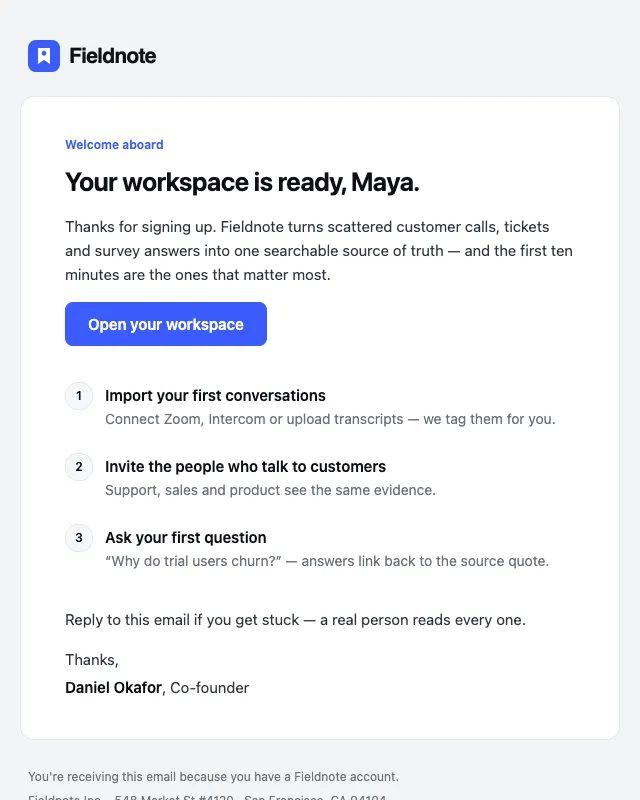 Free
FreeWelcome
№01 · OnboardingA founder-signed welcome with one primary action and a three-step activation checklist.
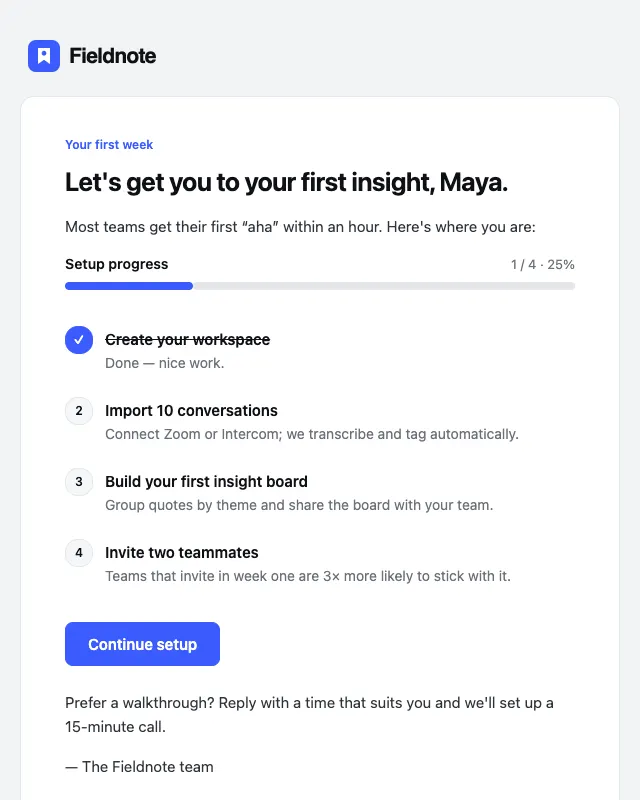
Getting started
№03 · OnboardingActivation checklist that ticks off completed steps and shows progress at a glance.
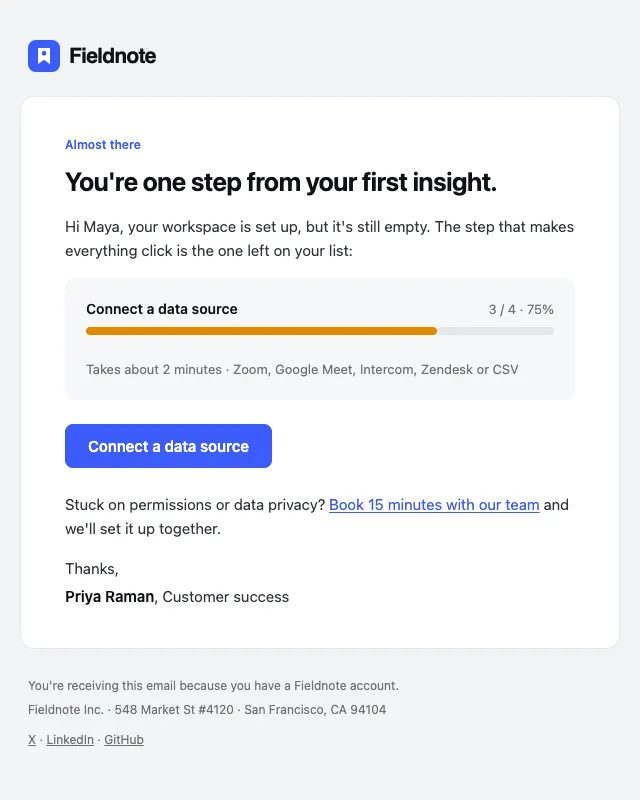
Finish setup nudge
№04 · OnboardingShort nudge for users who stalled on a single setup step, with a progress meter.
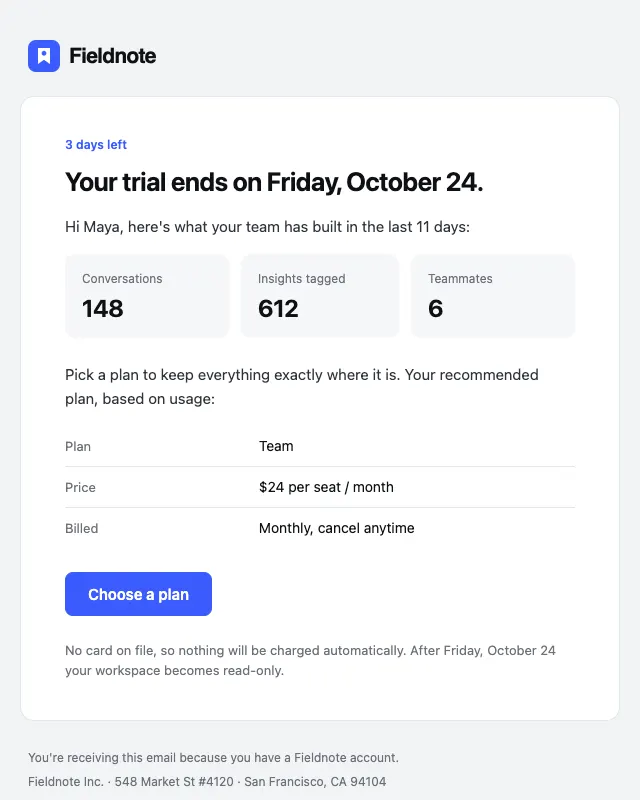
Trial ending
№05 · OnboardingTrial reminder that recaps what the user built and makes the plan choice obvious.